
Why Cloud Accounting Software Comparison Matters for Growing Businesses
Comparing cloud accounting tools is essential for entrepreneurs who want to ditch spreadsheets and desktop programs that tie them to a single computer. With over 4.4 million businesses already relying on cloud solutions such as Xero, and QuickBooks Online serving 7 million customers globally, the shift to web-based financial management is impossible to ignore.
Here’s a quick look at the leading options:
Quick Comparison Overview:
- QuickBooks Online – Best for US small businesses ($35-$235/month) with a strong accountant network
- Xero – Best for unlimited users ($20-$80/month) with 1,000+ app integrations
- FreshBooks – Best for service businesses ($15-$50/month) with built-in time tracking
- Sage Intacct – Best for mid-market companies with complex requirements
- Wave – Best free option for micro-businesses that need basic invoicing
- Zoho Books – Best for startups (free up to 1,000 invoices/year)
Research shows that 52 % of accounting-software buyers budget under $210 per month, while 80 % of small businesses report positive ROI after adopting AI-powered finance tools.
Cloud accounting removes manual data entry, enables real-time collaboration with your team and accountant, and gives you secure access to your financials from any device. As one expert put it: “Managing the finances of a business is challenging, time-consuming work, especially for small business owners who have to do it all themselves.”
The key is choosing software that fits your business type, growth stage, and budget—not simply selecting the most popular name.
Must-know terms for anyone researching cloud finance tools:
What You’ll Learn
In this guide you’ll find the biggest benefits of moving your books online, get a step-by-step checklist for choosing a platform, and pick up practical migration tips that keep your data safe. We’ll break down which solutions work best for different business models and show you how to scale your accounting system as you grow.
Why Switch to Cloud Accounting?
Picture this: you’re at a coffee shop and a client asks about their latest invoice. Instead of saying “I’ll check when I get back to the office,” you pull out your phone and have the answer in seconds. That’s the freedom cloud accounting delivers—no special laptop, no office VPN, just instant access.
Your Office Is Everywhere Now
Cloud-based tools turn your smartphone into a financial command center. Whether you’re visiting clients or working from your kitchen table, your books travel with you. When a contractor needs payment approval on a Friday evening or you spot a billing error during a weekend review, you can act immediately.
Team Collaboration That Actually Works
Goodbye to emailing spreadsheets back and forth. Your bookkeeper can categorize expenses while you create invoices, and your accountant can review everything in real time without you lifting a finger. This seamless collaboration means faster month-end closes, fewer errors, and more time for what matters—growing your business.
Smart Money Management
Most small businesses spend more on desktop software than they realise. Between licences, annual updates, IT support, and the hidden costs of downtime, those “one-time” purchases add up quickly. Cloud solutions charge predictable monthly fees while giving you enterprise-level features that would cost thousands to build independently.
Security That Lets You Sleep at Night
Your financial data deserves better protection than a single laptop password. Cloud providers invest millions in security infrastructure—encryption, multi-factor authentication, automated backups—that happens whether you remember or not. While you focus on customers, your platform quietly handles updates, security patches, and data protection.
Feature Checklist Every SMB Needs
Choosing the right cloud ledger can feel overwhelming when you’re staring at dozens of feature grids. But you don’t need every bell and whistle—just the functions that save time, reduce errors, and guide better decisions.
Think of this list as a survival guide for evaluating accounting platforms. The items below separate tools that truly help your business from those that merely look impressive on paper.
Start with automation basics. Your software should handle bank-feed integration automatically, pulling transactions from your accounts without manual entry. Look for automated invoice creation and recurring billing—sending the same invoice every month shouldn’t eat up your Tuesday afternoon.
The best platforms also offer expense categorisation with OCR receipt scanning. Snap a photo of that coffee receipt and let the system figure out where it belongs. Add automated payment reminders, and you’ve got a solution that chases down late payers while you focus on operations.
Your invoicing needs to work as hard as you do. Professional templates should match your brand, not look like they came from 1995. If you serve international clients, multi-currency support is essential.
Online payment integration turns invoices into cash faster. For service firms, project-based billing and time tracking stop scope creep from eating profits.
Real-time financial reporting is where cloud accounting shines. Access profit-and-loss statements, cash-flow forecasts, and budget vs. actual comparisons without waiting for month-end.
The real magic appears when your accounting system plays nicely with the rest of your tech stack. Check for CRM and e-commerce connections, payroll integrations, and a third-party app marketplace. According to Scientific research on accounting software features, businesses that prioritise automation and integration see the highest productivity gains.
Don’t overlook security: role-based access controls, multi-factor authentication, and audit trails protect your most sensitive information.
For a deeper dive into automating everyday workflows, explore our Business Process Automation Guide.
Cloud Accounting Software Comparison: Top Picks and Ideal Users
Matching a platform to your specific business model is far more important than chasing the biggest brand name. After testing dozens of tools, we’ve identified clear winners for different scenarios.
| Software | Monthly Cost | Best For | Key Strengths | User Limit |
|---|---|---|---|---|
| QuickBooks Online | $35-$235 | US small businesses | Accountant network, reporting | 1-25 |
| Xero | $20-$80 | Growing teams | Unlimited users, integrations | Unlimited |
| FreshBooks | $15-$50 | Service firms | Time tracking, invoicing | 5-Unlimited |
| Sage Intacct | $400+ | Mid-market | AI features, multi-entity | 10+ |
| Wave | Free-$16 | Micro-businesses | Free core features | Unlimited |
| Zoho Books | Free-$240 | Startups | Affordable scaling | 1-10 |
The sweet spot for most small companies is $35-$80 per month—enough to open up professional features without breaking the bank. Yet your industry and workflow matter more than price.
Freelancers
FreshBooks is a standout for anyone who bills by the hour. Start a timer from your phone while meeting clients, then convert those hours into polished invoices. Its GPS-based mileage tracking automatically suggests trips to claim as deductions.
A leaner option is QuickBooks Self-Employed at $20 per month. It excels at micro-invoicing, expense categorisation, and simplified tax prep—especially handy if you’re still mixing personal and business spend.
Key freelancer must-haves: mobile invoicing, automatic expense categorisation, and integrated time tracking.
Service Businesses
Xero shines when collaboration is vital. Unlimited user access lets every team member log expenses, track project time, and access client records without extra seat fees. Project-time tracking highlights your most profitable clients and warns when budgets run thin.
On a tighter budget, Zoho Books gives new service firms up to 1,000 invoices per year for free, plus smart expense automation that learns your habits over time.
Top priorities: client portals for approvals, recurring billing, and multi-currency support for international work.
Product & Retail
QuickBooks Online dominates retail with robust inventory management. Track stock across multiple locations, calculate COGS automatically, and receive low-stock alerts. Seamless multi-channel sales integration connects to Shopify, Amazon, and more.
For larger catalogues, Sage Intacct offers advanced inventory valuation, multi-location tracking, and AI-based anomaly detection that flags unusual transactions.
Retail essentials: real-time inventory, automated COGS, purchase-order management, and optional barcode scanning for quick stock counts.
Implementation, Migration & Scaling
Switching systems may feel like jumping in at the deep end, but modern vendors make migration surprisingly straightforward. Think of it like moving house—there’s packing and unpacking, yet the new space soon feels worth the effort.
Get Your Data Ready
Export everything from your current system (customers, vendors, chart of accounts, transaction history) as CSV or Excel. Clean the data first—remove duplicates, standardise naming, and confirm account mappings.
Most cloud platforms provide import wizards that guide you step-by-step. They’re designed for busy owners who have better things to do than wrestle with CSV errors.
Learn the Ropes
Take advantage of free onboarding resources. Live setup assistance during the first 90 days can save hours. Video tutorials, knowledge bases, and webinars let you learn at your own pace. Many vendors even assign a customer-success manager whose goal is to make you proficient quickly.
Connect Your Tools
Use API integrations to link accounting with the rest of your stack—your CRM software small business platform, e-commerce store, and payment processors. Automated workflows eliminate redundant data entry.
Growth Phases
Startup (1-10 employees)
Focus on low-cost or free tiers—Wave, Zoho Books, and Xero all cover invoicing, expense tracking, and basic reporting without straining the budget.
Scale-up (10-50 employees)
As complexity increases, user management and advanced reporting become essential. QuickBooks Online and Xero handle multiple users gracefully and provide deeper insights. Role-based access ensures people only see what they need.
Mid-Market (50+ employees)
At this size, multi-entity consolidation, advanced analytics, and strict compliance controls turn into necessities. Sage Intacct leads with AI-powered insights that help teams identify trends and opportunities, freeing up time once spent on manual processes.
Security & Compliance Essentials
When you’re trusting the cloud with your financial data, security isn’t just a nice-to-have feature – it’s the foundation that keeps your business running smoothly. The good news? Leading cloud accounting platforms often provide better security than most small businesses could implement on their own.
According to Scientific research on cybersecurity predictions, 80% of enterprises are expected to adopt advanced cloud cybersecurity strategies by 2025 – and for good reason.
Your Data Deserves Military-Grade Protection
The best cloud accounting platforms use end-to-end encryption for all your data, whether it’s sitting in storage or traveling across the internet. This means your financial information is scrambled into unreadable code that only authorized users can decode. Look for platforms that maintain SSL/TLS certificates and conduct regular security audits.
Multi-Factor Authentication Is Your Best Friend
Here’s where many businesses drop the ball: they choose strong passwords but skip multi-factor authentication (MFA). MFA adds an extra layer of protection by requiring a second form of verification, like a text message code or authenticator app. It’s like having a deadbolt and a chain lock on your front door.
Smart user management goes beyond just passwords. Role-based permissions ensure that your part-time bookkeeper can’t accidentally access sensitive payroll data, while your sales team can create invoices without seeing your profit margins. Every action gets logged in detailed audit trails.
Compliance Certifications That Actually Matter
When conducting your cloud accounting software comparison, pay attention to these key certifications. SOC 2 Type II certification means the platform has been independently verified for security and availability. GDPR compliance protects your European customers’ data. PCI DSS certification is essential if you process credit card payments through your accounting software.
ISO 27001 certification is like a gold standard for information security management. These certifications represent thousands of hours of testing and verification by independent security experts.
Backup and Recovery: Your Safety Net
The best security in the world won’t help if your data disappears due to a server failure or natural disaster. Quality cloud accounting platforms provide automated daily backups with point-in-time recovery options. This means if something goes wrong, you can restore your data to exactly how it was at any specific moment.
For businesses serious about expense management security, consider integrating specialized Business Expense Tracking Apps that offer improved fraud detection and automated policy enforcement. These tools can flag unusual spending patterns and prevent unauthorized expenses before they hit your books.
Choosing secure cloud accounting isn’t just about protecting your data – it’s about protecting your business’s future. The few extra dollars spent on a platform with robust security features pale in comparison to the potential costs of a data breach or compliance violation.
Frequently Asked Questions about Cloud Accounting
How hard is it to migrate from desktop systems?
The short answer: easier than most owners expect. For straightforward books, migration takes 2-4 weeks. Multi-entity setups or years of messy data may stretch to 2-3 months.
Most cloud vendors want your business badly enough to help. Expect migration tools, import wizards, and often free support for the first 90 days.
Preparation is everything: export data as CSV, clean it, then run both systems side-by-side for a short period to catch issues before you fully commit.
What integrations should I prioritise first?
Start with connections that stop you typing the same information twice.
- Bank feeds – automatic transaction import saves hours and eliminates typos.
- Payment processors (Stripe, PayPal, Square) – payments posted to the right invoices automatically.
- E-commerce platforms – Shopify, WooCommerce, or Amazon sync orders directly to your books.
- Payroll services – integrations with Gusto, ADP, and others keep employee costs organised.
- CRM systems – Salesforce or HubSpot integration keeps customer details consistent.
Xero boasts 1,000+ third-party apps, while QuickBooks Online offers the deepest connections for US businesses.
How do subscription costs compare long term?
Cloud subscriptions typically cost less than desktop software once you factor in upgrades, IT support, and backups.
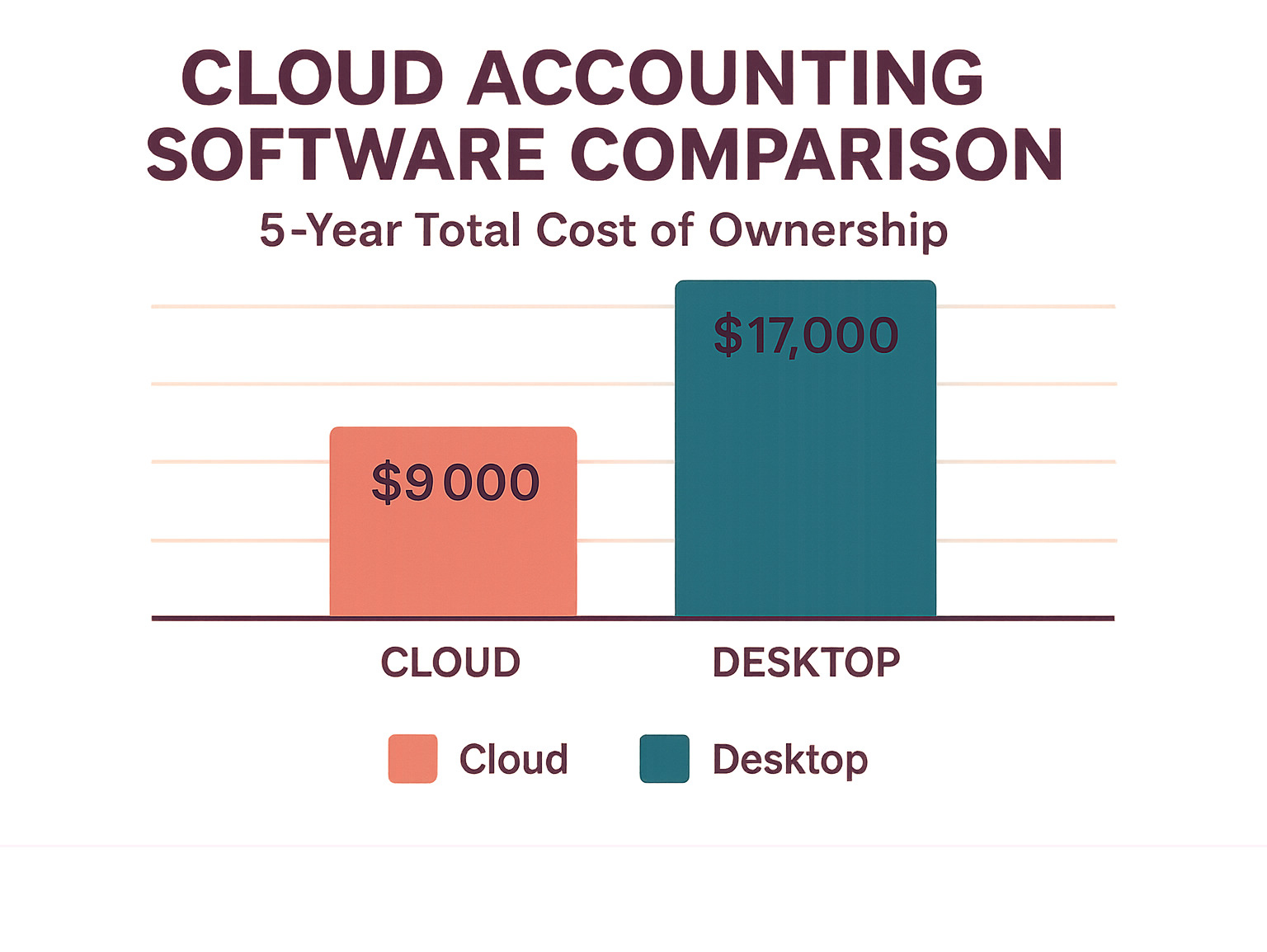
Entry-level cloud plans average $144 per month, while premium tiers run about $312 per month. Those fees include automatic updates, security, backups, and support—items you’d otherwise pay for separately with desktop solutions.
Productivity gains often offset the subscription entirely. Sage Intacct users, for example, report boosting productivity by more than 50 % after switching.
Always calculate total cost of ownership: subscription fees, add-on modules, training, and—most importantly—the value of time saved.
Conclusion
Finding the perfect accounting tool is a bit like dating—you need the right match for your current situation and future plans.
Business Type Matters
Freelancers love FreshBooks for its seamless time tracking, while retailers swear by QuickBooks Online’s inventory tools.
Growth Stage Counts
Wave’s free plan or Zoho Books’ generous tier suits brand-new startups. As your team expands, Xero’s unlimited user policy or QuickBooks Online’s advanced reports become invaluable.
The numbers support investing wisely: although 52 % of buyers budget under $210 monthly, those who choose the right platform often see dramatic productivity gains. Sage Intacct customers, for instance, have boosted productivity by 50 % or more.
Integration Is the Secret Sauce
Xero’s 1,000-plus app marketplace and QuickBooks Online’s deep US banking links illustrate how integrations can streamline operations.
Our Recommendation
For general small-business needs, QuickBooks Online delivers a well-rounded feature set and a vast accountant network. Growing teams that value flexibility might lean toward Xero. Service businesses should consider FreshBooks, while brand-new ventures can start strong with Wave.
The financial-management software market is surging toward $24.4 billion by 2026—proof that cloud solutions are becoming essential infrastructure, not optional upgrades.
Ready to level up? Take the next tech step with our toolbox and explore more guides on business technology. Choose wisely today, and your accounting platform will become the financial backbone that supports your entrepreneurial dreams tomorrow.